Is your MacBook running slowly, refusing to charge, overheating, or showing a damaged screen? Get professional Apple MacBook service in Hyderabad from experienced technicians who understand the repair needs of MacBook Air and MacBook Pro models.
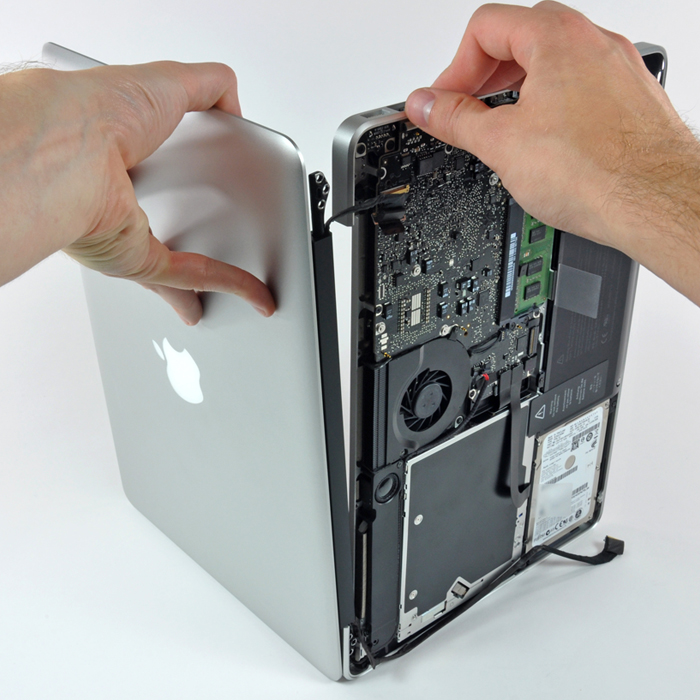
We provide reliable MacBook repair solutions for common hardware and software problems, including screen replacement, battery replacement, keyboard and trackpad repairs, charging issues, motherboard repair, water damage recovery, SSD upgrades, data recovery, and macOS troubleshooting.
Whether your MacBook is used for work, business, studies, or creative projects, our goal is to identify the problem, explain the available repair options, and help you get your device back to working condition with minimal hassle. Looking for a trusted MacBook repair service in Hyderabad? Contact our team to discuss your MacBook issue and find the right repair solution.
MacBook problems can interrupt your daily routine and affect your productivity. Our technicians diagnose hardware and software issues to recommend suitable repair solutions based on your device's condition.
A cracked display, flickering screen, vertical lines, black screen, or display discoloration can make your MacBook difficult to use. These problems may result from accidental drops, pressure damage, or internal display faults. Our MacBook screen repair service in Hyderabad helps identify the cause of display issues and determine whether a screen replacement or another repair is required.
Does your MacBook battery drain quickly, shut down unexpectedly, or fail to hold a charge? Battery performance can deteriorate over time, especially after repeated charging cycles. Our MacBook battery replacement service helps restore reliable battery performance when the existing battery is worn out or faulty. We can assess battery health and explain the appropriate replacement options for your model.
Unresponsive keys, repeated characters, sticky keyboard buttons, and trackpad problems can make everyday tasks frustrating. These issues may be caused by wear, liquid exposure, or internal hardware faults. Our MacBook keyboard and trackpad repair service focuses on diagnosing the underlying problem and recommending the appropriate repair.
If your MacBook is not charging, disconnects from power repeatedly, or fails to turn on, the problem may involve the charging cable, adapter, port, battery, or internal power circuitry. Our technicians inspect the charging system to help identify the source of the issue before recommending a suitable repair.
A MacBook that will not power on, repeatedly restarts, or experiences persistent hardware failures may have a motherboard or logic board problem.Motherboard repairs require careful diagnosis because multiple components can cause similar symptoms. Our technicians assess the device to determine whether component-level repair or another solution is appropriate.
The repair approach depends on the model, the extent of the damage, and component availability.
Spilled water, coffee, or other liquids can damage internal MacBook components, sometimes even when the device appears to work initially.
If your MacBook has suffered liquid damage, switch it off if safe to do so, disconnect the charger, and avoid repeatedly attempting to power it on. Arrange a professional inspection as soon as possible.
Our MacBook water damage service includes assessment of affected components and recommendations for cleaning or repairing damaged circuitry where feasible.
Important: Water damage recovery cannot be guaranteed. The likelihood of successful repair depends on the liquid involved, the time elapsed, and the extent of internal corrosion or component damage.
Running out of storage can affect your workflow, especially when you work with large documents, photos, videos, or creative applications.
We assess available storage options for compatible MacBook models and help you determine whether an SSD upgrade or another storage solution is possible.
SSD upgrade compatibility varies by MacBook model. Many newer MacBooks have integrated storage that cannot be upgraded in the same way as older models.
Lost files, an inaccessible drive, or a MacBook that no longer boots can put important documents, business records, and personal photos at risk. Our MacBook data recovery service assesses possible recovery options for supported storage devices and data loss situations.
Recovery results depend on the condition of the storage device and whether the data has been overwritten or encrypted. We recommend avoiding repeated recovery attempts or unnecessary software installations that could reduce the chances of successful recovery.
Not every MacBook problem requires a hardware repair. Slow performance, startup errors, application crashes, and software conflicts may be related to macOS or other software issues. Our macOS troubleshooting service helps identify and resolve suitable software-related problems.
We aim to identify the underlying cause before recommending software changes, reinstallations, or other corrective steps.
We provide repair support for a range of Apple MacBook models, subject to diagnostic capability, parts availability, and model-specific repair requirements.
From battery and display problems to charging faults and software issues, we help diagnose common MacBook Air problems and recommend suitable repair options.
For MacBook Pro devices used in demanding professional workflows, we assess issues involving displays, keyboards, batteries, charging systems, storage, and internal hardware.
Because repair methods differ across Intel-based and Apple silicon models, accurate model identification is an important first step.
Choosing a repair provider involves more than finding the nearest service centre. You need clear communication, accurate diagnosis, and repair options suited to your device.
We focus on professional standards to ensure your Apple device receives optimal care.
Practical diagnostic and repair support for common MacBook hardware and software issues.
Repair recommendations based on your MacBook model and reported symptoms.
An explanation of the identified problem and the proposed solution before proceeding.
Assessment of whether a component repair, replacement, or software fix is appropriate.
Careful consideration of your files and privacy during diagnosis and repair.
Repair costs and expected timelines communicated after assessment, where possible.
Appropriate replacement parts and repair procedures selected according to the device and repair requirements.
Service availability, warranty terms, turnaround times, and parts options should be confirmed before authorizing a repair.
We aim to make the repair process straightforward and easy to understand.
Tell us what happened, which MacBook model you use, and the symptoms you are experiencing.
Our technicians assess the reported issue and perform appropriate diagnostic checks.
We explain the likely cause, available repair options, estimated cost, and expected turnaround time where these can be established.
The repair proceeds after you understand and approve the proposed work.
Following the repair, relevant functions are checked and the device is prepared for handover.
Before service, back up your data if possible. If the device is not working or contains critical files, tell the technician before any reset, reinstallation, or storage-related procedure.
The cost of MacBook repair depends on the model, the nature of the fault, component availability, and the amount of work required.
For example, a battery replacement, screen replacement, charging repair, and motherboard repair involve different parts and diagnostic requirements. Water damage and data recovery costs can vary significantly depending on the extent of the damage.
To help us provide a quick quote, please share:
We recommend verifying these key details prior to authorization:
Understand any upfront fees for assessing your device's issue.
Get a clear breakdown of all part and labor expenses.
Know approximately when your MacBook will be ready for pickup.
Confirm the coverage duration for the parts and services rendered.
Verify data security protocols and backup procedures before service begins.
Contact us today for a full repair assessment and an accurate quote based on your MacBook's condition.
Contact Us Now